
Emergency documents: how to create a Digital File for your family
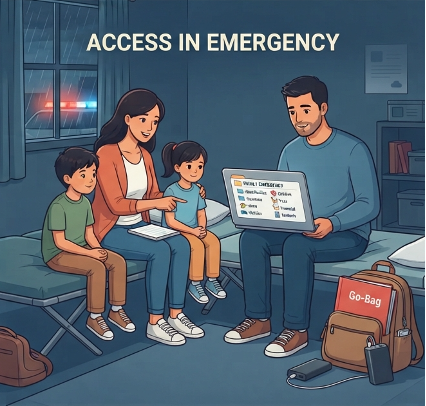
When we think about preparing for a hurricane, flood, or other natural disaster, we usually think about water, food, batteries, and medications. But there’s something we often forget until we actually need it: our important personal information.
Keeping original documents in a secure bag or folder is a great step. But what happens if you have to leave your home quickly and that bag stays behind? Or if you need to access important information from somewhere else?
That’s why, in addition to keeping physical documents in a safe place, it’s a good idea to create a digital system that allows you to access your family’s important information when you need it most.
You don’t have to be tech-savvy. You just need a system that is simple, secure, and easy to update.
Start with a list
Before you start scanning documents, make a list of what your family might need in an emergency.
You can start with:
IDs and driver’s licenses
Passports
Birth certificates
Marriage or divorce documents
Social Security cards
Insurance policies
Home documents
Vehicle information
Important medical records
Pet information
School documents for your children
Emergency contacts
FEMA includes similar categories in its Emergency Financial First Aid Kit (EFFAK), which is designed to help families organize personal, financial, and legal information before an emergency.
Digitize what really matters
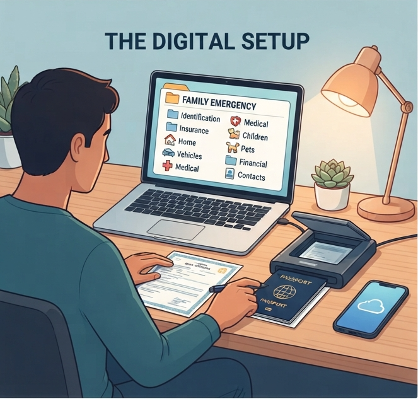
You don’t need to turn your entire home into a digital filing cabinet. Start with documents that would be difficult or expensive to replace. Scan each document or take a clear photo.
Make sure:
The entire document is visible.
The information is easy to read.
There are no reflections or cut-off sections.
The file name is easy to understand.
For example: Passport_Alejandra_2026.pdf
is much more useful than: IMG_5837.jpg
Create a simple folder structure
This is where organization really makes a difference. Instead of having dozens of files mixed together, create a folder structure that anyone in your family can understand.
For example:
FAMILY EMERGENCY
Identification
Insurance
Home
Vehicles
Medical
Children
Pets
Financial
Important Contacts
The key is to keep the system simple and predictable.
If someone needs to find your homeowner’s insurance policy, they should know exactly where to look.
Choose a secure digital location
You can use a cloud storage service that allows you to access your files from different devices.
But here’s one important rule: don’t store sensitive documents in a public folder or share unprotected links. Turn on two-factor authentication and use strong passwords.
For especially sensitive information, consider using a password manager that offers emergency access features.
The goal is to be able to access your information when you need it without creating an unnecessary security risk.
Don’t forget your phone
Your phone can be a very useful tool during an emergency. Make sure you have important information saved, such as:
Emergency contacts.
Family members’ phone numbers.
Insurance information.
Doctor’s contact information.
Veterinarian information.
School contact information.
Important medication information.
It’s also a good idea to keep a portable phone charger fully charged and ready to go.
Ready.gov recommends keeping important information available both digitally and on paper and having different ways to communicate during an emergency.
Create an extra backup
Here’s the part many people forget. One backup may not be enough. If everything is stored only on your computer and that computer is damaged, you could lose access to your information.
Consider having:
A- Physical copy:
In your emergency document bag or secure folder.
B- Main digital copy:
In a secure cloud storage service.
C- Additional backup:
On another device or in another secure location.
You don’t need to make this complicated. Just don’t rely on one single place.
Make sure someone you trust knows about it
A perfectly organized system isn’t very helpful if only you know how to find the information.
Your partner or another trusted person should know:
That the file exists.
Where it is stored.
How to access it.
Where the physical folder is kept.
You don’t necessarily need to share every document with other people. The important thing is to have an access plan.
Give it a review date
Your organization system isn’t finished once you create the folder. Every six months, take a few minutes to check:
Are there new documents?
Has a passport expired?
Has an insurance policy changed?
Has your address changed?
Have any emergency contacts changed?
Is there a new member of the family?
Are there documents you no longer need?
You can connect this review to something you already do, such as the beginning of hurricane season or the change of seasons.
That way, updating your files becomes a habit instead of another thing you have to remember.
A system that works for you
Organizing emergency documents may not be the most exciting task, but it’s one of those small things that can make a big difference when you really need it.
The goal isn’t to spend your time worrying about everything that could go wrong. It’s simply knowing that if something happens, the information you need isn’t lost in a drawer, buried in an old email, or stuck on a computer you don’t have with you.
Your home can be organized in many different ways. Sometimes, being organized simply means being ready and prepared with clear systems.
Start today
Don’t try to digitize every document in your home at once. Choose just one category. Insurance, for example, and create your first folder. One small step now can become a system that gives you much more peace of mind tomorrow.
Some Articles You Might Find Interesting